Technical Deep Dive

EKS Manager Onboarding

Precise IAM Role Delegation & Spoke Orchestration

Multi-Account Identity Lifecycle

This flow details how the onboarding script initializes the EKSManagerAgentRole and the EKSManagerAdmin roles to create a secure, cross-account management plane — with no persistent credentials and no inbound access required.

Architecture Reference
Global Boundary & Governance

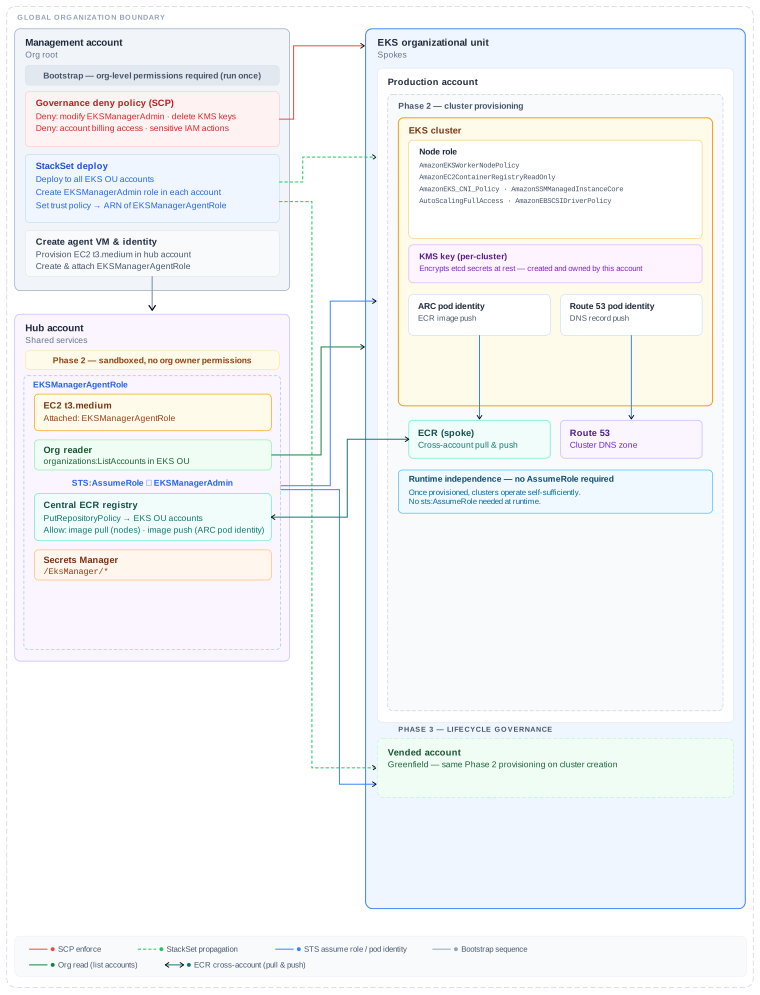
The diagram below shows the full cross-account topology that the onboarding script produces. Expand each phase below for the precise steps.

EKS Manager global architecture diagram

Management account (top-left)  ·  Hub / shared services (bottom-left)  ·  EKS organizational unit spokes (right)

Onboarding Flow
Three-phase initialization

The script runs once with org-level credentials, then hands off to the sandboxed agent for all future operations.

PHASE 1
Foundation bootstrap
Org-level permissions required · run once
What it does
1
Apply governance deny policy (SCP)
An SCP is attached to the EKS OU blocking modification of EKSManagerAdmin, deletion of KMS keys, billing access, cost explorer, and sensitive org management actions. This layer is enforced by AWS Organizations and cannot be overridden by any role inside the OU.
aws organizations attach-policy --policy-id p-EKSManagerDenyPolicy --target-id ou-xxxx-EKSOU # EKS organizational unit
2
Deploy StackSet to all EKS OU accounts
A CloudFormation StackSet is deployed org-wide into every account in the EKS OU. Each stack instance creates the EKSManagerAdmin IAM role and sets its trust policy to the ARN of EKSManagerAgentRole in the hub account.
# StackSet creates in each spoke account: Role: EKSManagerAdmin Trust: arn:aws:iam::HUB_ACCT_ID:role/EKSManagerAgentRole Managed: AdministratorAccess # scoped by SCP deny layer
3
Assume org role into hub account
The script assumes OrganizationAccountAccessRole into the hub / shared services account. This role is created automatically by AWS Organizations in every member account — no manual setup required.
aws sts assume-role --role-arn arn:aws:iam::HUB_ACCOUNT_ID:role/OrganizationAccountAccessRole --role-session-name eks-manager-bootstrap
4
Create agent VM & attach EKSManagerAgentRole
An EC2 t3.medium is provisioned in the hub account using the provided VPC, subnet, and security group. The EKSManagerAgentRole is created and attached as the instance profile. The agent software is installed and started. No long-lived credentials are stored anywhere.
# Role permissions granted to EKSManagerAgentRole: sts:AssumeRole # into EKSManagerAdmin in each spoke organizations:List* # read-only org discovery (org reader) secretsmanager:Get* # namespace /EksManager/* ecr:* # central ECR registry in hub account
Required parameters
Parameter Description
--instance-name Name tag for the EC2 agent VM
--vpc-id VPC where the agent VM will be created e.g. vpc-xxxxxxxx
--subnet-id Subnet for agent VM placement — must have a NAT gateway route for outbound internet access
--security-group-id Security group for the agent VM. Outbound 443 only — no inbound rules required. SSM access is used for shell access in place of SSH.
--account-id Hub / shared services AWS account number where the agent VM will be provisioned
--region AWS region for agent VM, ECR registry, and Secrets Manager namespace e.g. eu-west-1
--eks-ou-id EKS Organisational Unit ID — SCP attachment target and StackSet deployment scope e.g. ou-xxxx-xxxxxxxx
--eks-admin-arn IAM role or SSO permission set role ARN granted cluster-admin on all spoke clusters. For IAM Identity Center, use the consistent role ARN pattern across accounts e.g. arn:aws:iam::*:role/AWSReservedSSO_EKSAdmin_xxxx
▼   agent takes over — no org owner permissions from here
PHASE 2
Cluster provisioning onboarding
Sandboxed · no org owner permissions
1
Discover spoke accounts via org reader
The agent calls organizations:ListAccounts scoped to the EKS OU to enumerate spoke accounts. This is a read-only operation — the agent has no write access to Organizations at any point in Phase 2.
2
Assume EKSManagerAdmin in the target account
For each account, the agent calls sts:AssumeRole using its instance profile. This returns a scoped session that is used for all subsequent operations in that account. The session expires automatically — no credentials are persisted.
sts assume-role --role-arn arn:aws:iam::SPOKE_ID:role/EKSManagerAdmin --role-session-name eks-manager-session
3
Create per-cluster KMS key
A dedicated KMS key is created in the spoke account and used to enable envelope encryption of Kubernetes secrets stored in etcd. The key is created and owned entirely within the spoke account — it never leaves the account boundary and cannot be accessed by the hub agent after provisioning. KMS encryption is enabled at cluster creation so all secrets are encrypted from day one.
aws kms create-key --description "EKS etcd encryption - cluster-name" --key-usage ENCRYPT_DECRYPT # Key ARN passed to EKS cluster creation: aws eks create-cluster --encryption-config '[{"resources":["secrets"],"provider":{"keyArn":"arn:..."}}]'
⚠️ Existing clusters
If you are bringing an existing cluster under EKS Manager management, KMS encryption only applies to secrets written after the key is enabled. Existing secrets in etcd remain unencrypted until you re-encrypt them manually by running the following command against the cluster before installing the core stack:
kubectl get secrets --all-namespaces -o json | kubectl replace -f -
This reads every secret and writes it back, triggering KMS encryption on each one. This step is the responsibility of the cluster owner.
4
Create EKS cluster & node role
The EKS cluster is provisioned with the KMS key attached for etcd encryption, and a node role is created with the following managed policies attached. The node role is what allows worker nodes to pull images from the central ECR registry in the hub account.
PolicyPurpose
AmazonEKSWorkerNodePolicyCore EKS node registration
AmazonEC2ContainerRegistryReadOnlyECR image pull from hub
AmazonEKS_CNI_PolicyVPC networking for pods
AmazonSSMManagedInstanceCoreSSM Session Manager access
AutoScalingFullAccessNode group scaling
AmazonEBSCSIDriverPolicyPersistent volume support
🔒
Runtime independence — no AssumeRole required
Once provisioned, the cluster operates entirely self-sufficiently. Node image pulls use the ECR resource policy directly — no cross-account sts:AssumeRole is needed at runtime. The agent's credentials are never present inside the cluster.
5
Create pod identity associations
Two EKS pod identity associations are created. These allow specific pods inside the cluster to assume scoped IAM roles without storing credentials — the identity is injected by the EKS pod identity agent at runtime.
ARC pod identity ECR push
Allows ARC workloads to push built images to the central ECR registry in the hub account. Cross-account access is granted via ECR resource policy — no AssumeRole required at runtime.
Route 53 pod identity DNS push
Allows DNS-managing pods (e.g. external-dns) to upsert records into the cluster's Route 53 hosted zone. Scoped to route53:ChangeResourceRecordSets on the cluster zone only.
6
Configure central ECR cross-account access
The agent updates the ECR repository policy in the hub account to grant the spoke account's node role pull access and the ARC pod identity push access. This is a resource policy on the ECR side — the spoke account needs no IAM changes.
# ECR resource policy grants per spoke: ecr:BatchGetImagenode role ARN # pull ecr:GetDownloadUrlForLayernode role ARN # pull ecr:BatchCheckLayerAvailabilitynode role ARN ecr:PutImageARC pod identity ARN # push ecr:InitiateLayerUploadARC pod identity ARN # push
▼   ongoing — SCP enforced at OU level
PHASE 3
Lifecycle governance
Ongoing · SCP-enforced
1
New accounts inherit EKSManagerAdmin automatically
When a new AWS account joins the EKS OU, the StackSet automatically deploys EKSManagerAdmin into it with the correct trust policy. No manual intervention is required — the agent detects the new account on its next scan via org reader and begins Phase 2 provisioning.
2
SCP deny layer cannot be bypassed
The SCP applied to the EKS OU is enforced by AWS Organizations above the account level. Even EKSManagerAdmin itself cannot modify the SCP, delete KMS keys, or access billing — the deny is unconditional and applies to all principals including root.
3
Secrets deployment
Secrets are stored by you directly into AWS Secrets Manager in the hub account under the /EksManager/* namespace. For each secret you define which clusters and namespaces it should be deployed to. Deployment is on-demand — the agent pushes the secret as a Kubernetes secret only when triggered by you. Secrets never transit the EKS Manager server.
4
Cluster isolation at runtime
Once provisioned, each cluster operates entirely independently — the agent's IAM session is never present inside a running cluster. Node image pulls use the ECR resource policy directly, pod identities are scoped per-workload, and KMS keys are per-cluster. There is no ambient cross-account sts:AssumeRole at runtime. A misconfiguration or compromise in one spoke account cannot propagate to another.
per-cluster KMS ECR resource policy scoped pod identities SCP deny at OU
IAM Reference
Role delegation map

Every role in the management plane and what it can do.

Role Account Trusted by Key permissions
EKSManagerAgentRole Hub EC2 instance profile sts:AssumeRole org:List* secretsmanager:Get*
EKSManagerAdmin Each spoke EKSManagerAgentRole ARN AdministratorAccess scoped by SCP
NodeRole Each spoke EC2 service ECR pull EKS worker SSM EBS CSI
ARC pod identity Each spoke EKS pod identity agent ECR push (hub)
Route 53 pod identity Each spoke EKS pod identity agent route53:ChangeRecords
Get Started
Ready to run the onboarding script?

The script runs from AWS Cloud Shell in under 15 minutes. No inbound firewall rules, no VPN, no persistent credentials on our side.

Contact Us → ← Architecture overview